org-mode Day Planning with Time Blocks
I’ve discovered, over the years, that setting a clear intention is closely correlated to a day well spent. I know that, when I decide what I want to do early in the morning—before being overwhelmed by email, Slack, Zulip, Discord, and all the other little attention grabbers—that I have a better chance of doing something I care about.
It seems like, in 2026, slow, intentional work is en vogue, with books like Burkeman’s “Meditations for Mortals” and Cal Newport’s “Slow Productivity” doing the rounds. As my friends know, I am fascinated (and inspired) by the Stoics and enjoy listening to the various teachers on Waking Up, many of whom echo the same idea: that mindful, focused effort is vastly more satisfying than responding to whatever seems urgent.
Time-blocking #
How we set intention is personal, and recommending any specific system feels trite. However, I have found that, for me, planning a rough schedule for the day—often called time-blocking—is a great way to think about what I want to do, how much of it I want to do, and when I want to do it.
Trying to follow such a schedule brings home many realities quickly:
- That the hours go by more quickly than one tends to think. For me, this is a reminder that the day is precious.
- That we often do a poor job at estimating how long work will take. Typically, we imagine we can do much more in a day than is realistic.
- That unscheduled interruptions are common. And others, like breaks for exercise, eating, etc., should be taken into consideration.
Implementation #
I use org-mode to outline my day, and have capture templates for each
week and each day. For this year, I have a file 2026.org in which I
capture all those entries.
The day planner template is most relevant here:
** %u

- [ ] Scan [[mu4e:query:maildir:/INBOX flag:flagged][pinned emails]] for new tasks (max 10 mins)
- [ ] Scan [[https://github.com/notifications][GitHub]] for new tasks (max 10 mins)

*** Plan
****
**** Lunch + walk <%<%Y-%m-%d %a 13:00-13:45>>
****
**** Tidy up <%<%Y-%m-%d %a 16:45-17:00>>

*** Notes
It is then hooked up to my org-capture-templates.
I use org-indent mode, so all those heading stars collapse.
The part I’d like to discuss in this post is the “Plan” section, where I outline my work for the day.
The time stamps in org-mode are neat: you’ll see the lunch entry
goes from 13:00 to 13:45 (and this is how it is stored on disk), but
when modifying it in org-mode it is displayed for editing in the
minibuffer as 13:00+0:45. This makes it very easy to adjust the
duration of an event. Note that the day timestamp (%u) is
inactive,
whereas the time blocks are active, so that only the latter appear in
today’s Agenda view.
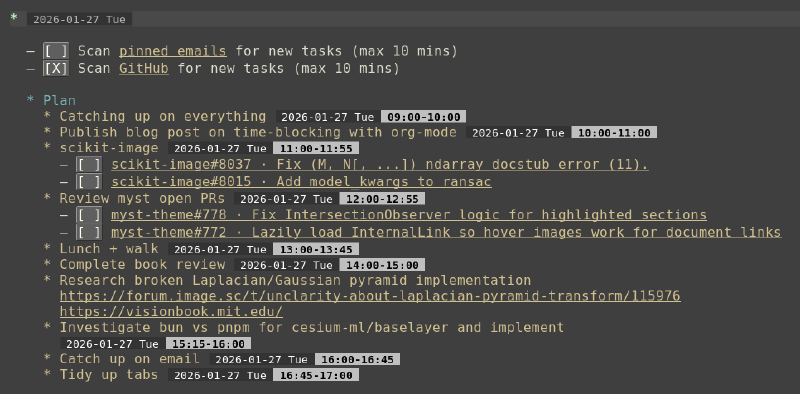
My time block planning for 2026-01-27, showing active timestamps following one another.
Elisp functions #
The above template is sufficient for doing time blocking in org-mode. However, we can reduce some friction in how we use it by adding some utility functions for common activities.
Here are three such functions that help me to craft and modify my daily plan smoothly:
-
Quickly navigate to today’s plan
This command is invoked inside
2026.org, and navigates to the current week, then day, then to the end of the “Plan” entry.(defun stefanv/org-jump-to-today-plan () "Jump to the end of the 'Plan' heading under today's date headline." (interactive) (let* ((today (regexp-quote (format-time-string (org-time-stamp-format nil t)))) (today-re (concat "^\\*+ .*?" today))) (goto-char (point-min)) (if (not (re-search-forward today-re nil t)) (message "Heading matching %s not found." today) (org-reveal) (save-restriction (org-narrow-to-subtree) (goto-char (point-min)) ;; Matches 'Plan' heading and optional trailing tags (if (re-search-forward "^\\*+ Plan\\(?:[ \t]*\\(:[[:alnum:]_@:]+:\\)\\)?[ \t]*$" nil t) (org-end-of-subtree) (widen) (message "No exact 'Plan' heading found under today's date."))))))It specifically searches for a
* Planheading, so if you modify the template be sure to update the regexp accordingly. -
Add a new planner entry, which follows the previous
This function takes the end time of the previous entry, and uses it as the start time for a new entry.
It tries to be somewhat clever at guessing your intention:
- If you invoke it on a blank line, it searches upward for the previous timestamp, and turns the current line into a heading.
- If invoked inside a section that already has a timestamp, it turns the next line into a timestamped heading.
- If invoked on a heading line without a timestamp, it adds the timestamp to the end, preserving cursor position.
(defun stefanv/org-plan-next ()
  "Create a new day plan entry following on the current or previous lines's active timestamp."
  (interactive)
  (let* ((ts-found (save-excursion
                     (end-of-line)
                     (when (re-search-backward org-ts-regexp0 nil t)
                       (let ((ctx (org-element-context)))
                         (when (eq (org-element-type ctx) 'timestamp) ctx)))))
         (is-blank (string-blank-p (buffer-substring (line-beginning-position) (line-end-position))))
         (is-header (org-at-heading-p))
         ;; Check if the found timestamp is actually on the current line
         (on-current-line (and ts-found
                               (>= (org-element-property :begin ts-found)
                                   (line-beginning-position)))))
    (if (not ts-found)
        (user-error "No timestamp found above point")
      (cond
       ;; Already has TS OR is plain text -> new heading below
       ((or on-current-line (and (not is-blank) (not is-header)))
        (end-of-line)
        (org-insert-heading)
        (save-excursion (stefanv/insert-formatted-org-ts ts-found)))

       ;; Current line is blank -> turn into heading here
       (is-blank
        (org-insert-heading)
        (save-excursion (stefanv/insert-formatted-org-ts ts-found)))

       ;; Current line is a header (no TS) -> append TS and return cursor
       (t
        (save-excursion
          (end-of-line)
          (stefanv/insert-formatted-org-ts ts-found)))))))

(defun stefanv/insert-formatted-org-ts (ts)
  "Helper to insert formatted timestamp with exactly one preceding space."
  (just-one-space)
  (insert (format "<%s %02d:%02d>"
                  (org-format-timestamp ts "%Y-%m-%d %a")
                  (or (org-element-property :hour-end ts)
                      (org-element-property :hour-start ts) 0)
                  (or (org-element-property :minute-end ts)
                      (org-element-property :minute-start ts) 0))))
If you use it often, you can bind the function to a key:
(keymap-set org-mode-map "C-c C-x p" #'stefanv/org-plan-next) -
Move all timestamps in a region forward by N minutes.
Sometimes, a day runs away from us, or we get carried away and miss the end of a timeblock. At that point, you’d likely want to shift your entire day forward. The following function lets you select several planner items and shift them all by N minutes (positive or negative). If no region is selected, operate on the current line.
There’s some fancy footwork to ensure that the surrounding org buffer is re-rendered, especially when using
org-modern.(defun stefanv/org-shift-timestamps-in-region (minutes) "Shift all active timestamps in the region (or current line) forward by MINUTES minutes." (interactive "nMinutes to shift: ") (let* ((region-active (use-region-p)) (beg (if region-active (region-beginning) (line-beginning-position))) (end (copy-marker (if region-active (region-end) (line-end-position)))) ;; Regex for active timestamps: matches < followed by anything until > (active-ts-re "<\\([0-9]\\{4\\}-[0-9]\\{2\\}-[0-9]\\{2\\}.*?\\)>")) ;; Allow undoing everything in one step (atomic-change-group (save-excursion (goto-char beg) ;; Shift active timestamps (while (re-search-forward active-ts-re end t) (save-excursion (goto-char (match-beginning 0)) (org-timestamp-change minutes 'minute) (when (fboundp 'org-element-cache-refresh) (org-element-cache-refresh (point))))) ;; Re-align tags for any headlines in the range (goto-char beg) (while (re-search-forward org-outline-regexp-bol end t) (org-align-tags)))) ;; Refresh (font-lock-flush beg end) (set-marker end nil) (message "Shifted active timestamps by %s minutes." minutes)))
Conclusion #
I’ve presented three utility functions that help me quickly plan and organize my day. I’d love to hear from you how you plan yours!